[Release] DarksTeam MuServer 97d+99i Beta 43.3

How, or where to change duration for energy elf's buffs?
Example, is that when I use buffs with elf, it does not last long, until I have to do it again.
When you buy a buff from guard, it lasts.
The original duration is 60 seconds, what you have there is a custom to change the duration, but bro DarkMaster hasn't finished the project so it's in an unfinished state.
 
The original duration is 60 seconds, what you have there is a custom to change the duration, but bro DarkMaster hasn't finished the project so it's in an unfinished state.
I went through all 120 pages.
I understand how DarkMaster was workin years to create this server to the point it is now. :)
Back in the day, when we didn't had new seasons to play and 97d+99i version was the most popular.
Had a nostalgic feeling, so I opened up a server for me and some friends. :))
Anyway, huge thanks to DarkMaster. I even managed to work the zen system now. :)

I was wondering, there is Data/lang/kor folder, with skills in there. Maybe there is a workaround for skill duration? It's that normally on files we have //explaining - like 1(id) (spell name) etc. But that part there is missing, and therefore I have no idea, of the number meanings. :)

27 "Defensive Bless" 20 0 50 0 6 10 0 0 1 0
28 "Offensive Bless" 25 0 60 0 6 10 0 0 1 0
 
  • Like
Reactions: DemonuMu
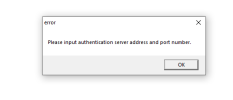
Hello.
I am trying to install the specified 97d files on Windows 10 Pro 2020.
I am encountering an issue with GameServer.exe not starting.
The ports are open, and the ODBC configurations are set up.
Can someone more experienced help me out?
 

Attachments

  • error.png
    error.png
    5.2 KB · Views: 15
Hello.
I am trying to install the specified 97d files on Windows 10 Pro 2020.
I am encountering an issue with GameServer.exe not starting.
The ports are open, and the ODBC configurations are set up.
Can someone more experienced help me out?
Check StartUp file in main server map, related to MuServer StartUP.
Also go through all folders and check if you have changed your ip everywhere. ;)
 
Check StartUp file in main server map, related to MuServer StartUP.
Also go through all folders and check if you have changed your ip everywhere. ;)
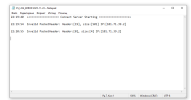
I changed the IP addresses as they do in all tutorials.
 
GameServer fixed.
New problem idk...
I cannot connect to the server.
 

Attachments

  • error2.png
    error2.png
    15.2 KB · Views: 40
  • Screen(11_23-22_27)-0000.jpg
    Screen(11_23-22_27)-0000.jpg
    142.2 KB · Views: 39
Guys please some help. I'm setting up everything as per the instructions but it says error cannot load shop 1 and error login server.exe fail
 
Guys please some help. I'm setting up everything as per the instructions but it says error cannot load shop 1 and error login server.exe fail
In darksteam files there is a one additional number per line (item in shop)
 
In darksteam files there is a one additional number per line (item in shop)
Thank you thats now gone. Ok so the server is now online and I managed to login however I had to make some changes.

thank you
 
Last edited:
Right. Now the server is working but I'm going through all the configs etc. From all boxes (it doesn't matter if 1,2,3,4 or 5) it drops different items but the options are always the same. FP boots + mana+add, Kundun staff + luck+speed+inc damage 20% etc. I've tried changing the files in the eventbag but just not happening. I've tried to change the common file in DTData folder -
[ExcellentItemDrop]
MinExcOptions = 1 // Min value 1
MaxExcOptions = 2 // Max value 6

I've tried all options 1,2 - 2,3 1,6 and it only changes how many option are added to the items.

Any ideas where the problem is please? I've tried using different eventitembags from other server files but that doesn't change anything.

Thank you

 
  • Like
Reactions: LTEMU
Right. Now the server is working but I'm going through all the configs etc. From all boxes (it doesn't matter if 1,2,3,4 or 5) it drops different items but the options are always the same. FP boots + mana+add, Kundun staff + luck+speed+inc damage 20% etc. I've tried changing the files in the eventbag but just not happening. I've tried to change the common file in DTData folder -
[ExcellentItemDrop]
MinExcOptions = 1 // Min value 1
MaxExcOptions = 2 // Max value 6

I've tried all options 1,2 - 2,3 1,6 and it only changes how many option are added to the items.

Any ideas where the problem is please? I've tried using different eventitembags from other server files but that doesn't change anything.

Thank you

It's not possible; the drop options are already defined. What's lacking, however, is the randomness of the items.
 
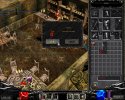
Why don't fruits work?
 

Attachments

  • Screen(01_14-09_58)-0000.jpg
    Screen(01_14-09_58)-0000.jpg
    394.1 KB · Views: 23
  • Screen(01_14-09_58)-0001.jpg
    Screen(01_14-09_58)-0001.jpg
    385.8 KB · Views: 23
How can i put blue feather to drop only in icarus?
Code:
// www.DarksTeam.NET
// -----------------------------------------------------------------------------------------------------------------------------------------
// [1] - Item Group (Between 0 and 15)
// [2] - Item Index (Between 0 and 31)
// [3] - Min Item Level (Between 0 and 15)
// [4] - Max Item Level (Between 0 and 15)
// [5] - Skill (1=drop with skill, 0=drop without skill, -1=random)
// [6] - Luck (1=drop with luck, 0=drop without luck, -1=random)
// [7] - Add (Between 0 and 7 or -1 for random)
// [8] - Excellent Options (Between 0 (non-excellent) and 63 (f.o) or -1 for random between MinExcOptions and MaxExcOptions in Common.ini)
// [9] - Min Monster Level (-1=drop from all monster levels)
// [10] - Max Monster Level (-1=drop from all monster levels)
// [11] - Drop Map (-1=drop in all maps)
// [12] - Except Map (-1=no except map)
// [13] - Monster ID (-1=drop from all monsters)
// [14] - Drop Rate x/10000
// -----------------------------------------------------------------------------------------------------------------------------------------
//     [1]     [2]     [3]      [4]    [5]     [6]     [7]     [8]     [9]      [10]    [11]   [12]     [13]    [14]
// -----------------------------------------------------------------------------------------------------------------------------------------
    13    14    0    0    0    0    0    0    -1    -1    10    -1    -1    30    // Blue Feather